cpnet
| Name | Last modified | Size |
|---|---|---|
| ../ | ||
| 88-VI-RTC.md | 24-Oct-2026 15:37 | 13.5 KB |
| AFORMAT.ASM | 24-Oct-2026 15:37 | 50.0 KB |
| BOOT.ASM | 24-Oct-2026 15:37 | 9.4 KB |
| CompuPro System Support 1.md | 24-Oct-2026 15:37 | 23.8 KB |
| CPM22.DSK | 24-Oct-2026 15:37 | 329.8 KB |
| CPNET.DSK | 24-Oct-2026 15:37 | 329.8 KB |
| cpnet.zip | 24-Oct-2026 15:37 | 1.4 MB |
| CPNET80.IMD | 24-Oct-2026 15:37 | 196.9 KB |
| CPNET80.JPG | 24-Oct-2026 15:37 | 46.5 KB |
| dri-cpnet.md | 24-Oct-2026 15:37 | 25.1 KB |
| LDRBIOS.ASM | 24-Oct-2026 15:37 | 15.0 KB |
| make-cpnet-disks.py | 24-Oct-2026 15:37 | 23.8 KB |
| MPMII_1.DSK | 24-Oct-2026 15:37 | 329.8 KB |
| NETWRKIF.ASM | 24-Oct-2026 15:37 | 22.3 KB |
| README.pdf | 24-Oct-2026 15:37 | 453.2 KB |
| REQBUILD.DSK | 24-Oct-2026 15:37 | 329.8 KB |
| reqbuild.toml | 24-Oct-2026 15:37 | 1.0 KB |
| requester.dsk | 24-Oct-2026 15:37 | 329.8 KB |
| requester.toml | 24-Oct-2026 15:37 | 950 bytes |
| RESXIOS.ASM | 24-Oct-2026 15:37 | 47.4 KB |
| server-ss1.dsk | 24-Oct-2026 15:37 | 329.8 KB |
| server-ss1.toml | 24-Oct-2026 15:37 | 1.8 KB |
| server.dsk | 24-Oct-2026 15:37 | 329.8 KB |
| server.toml | 24-Oct-2026 15:37 | 1.5 KB |
| SNIOS.ASM | 24-Oct-2026 15:37 | 15.6 KB |
| SRVBUILD.DSK | 24-Oct-2026 15:37 | 329.8 KB |
| srvbuild.toml | 24-Oct-2026 15:37 | 1009 bytes |
| SS1XIOS.ASM | 24-Oct-2026 15:37 | 52.0 KB |
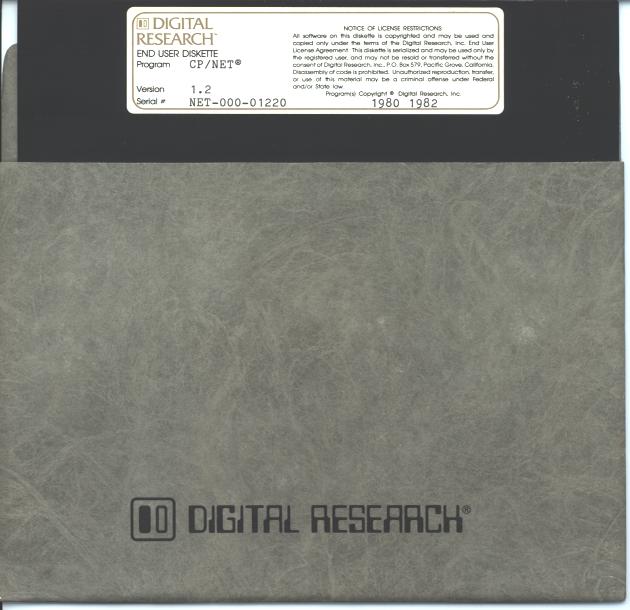
CP/NET 1.2 on two Altairs
CP/NET is the network of Digital Research. It lets a CP/M machine (the requester) use the disks and the printer of an MP/M II machine (the server). This folder has an Altair server and an Altair requester, connected by a serial line on port B of each 88-2SIO.
| File | What it is |
|---|---|
server.toml |
The server: MP/M II 2.1 on an Altair with 88-DCDD floppies and an 88-VI/RTC. |
server.dsk |
The server disk. The DBL PROM boots it into MP/M II with the CP/NET server. |
server-ss1.toml |
The server with a CompuPro System Support 1 in place of the 88-VI/RTC. |
server-ss1.dsk |
The server disk of server-ss1.toml. |
requester.toml |
The requester: CP/M 2.2 on an Altair with 88-DCDD floppies. |
requester.dsk |
The requester disk: CP/M 2.2 and the CP/NET requester files. |
NETWRKIF.ASM |
The network interface of the server, for RMAC. |
SNIOS.ASM |
The network I/O system of the requester, for RMAC. |
srvbuild.toml |
The CP/M 2.2 machine with two drives that builds the server disk. |
reqbuild.toml |
The CP/M 2.2 machine with two drives that builds the requester disk. |
CPM22.DSK |
A CP/M 2.2 disk that boots, with the tools for the builds. |
SRVBUILD.DSK |
The sources and the DRI files that the server build needs. |
REQBUILD.DSK |
SNIOS.ASM, the requester files of CP/NET, and LOGIN.ASM and LOGOFF.ASM. |
MPMII_1.DSK |
The files of DRI MP/M II disk 1. A copy of it becomes the new server disk. |
RESXIOS.ASM, LDRBIOS.ASM, BOOT.ASM, AFORMAT.ASM |
The XIOS, the loader BIOS, the cold start loader and the disk format program of MP/M II. |
SS1XIOS.ASM |
The XIOS of server-ss1.toml. |
make-cpnet-disks.py |
The script that does the steps of "Build the server disk" and "Build the requester disk" in the simulator. It built server.dsk, server-ss1.dsk and requester.dsk. |
CPNET.DSK |
The 29 files of the DRI CP/NET 1.2 disk, on an 88-DCDD disk. |
CPNET80.IMD |
The DRI CP/NET 1.2 distribution disk, as an ImageDisk file. |
CPNET80.JPG |
A photo of the disk and its label. |
dri-cpnet.md |
Notes on the DRI CP/NET Network Operating System Reference Manual. |
The MP/M II of the server is the one of the mpm2 example, with a network line in
place of console 1. This folder has its own copies of the MP/M II files, so that it needs no
other folder.
Run it
The two machines run in two windows. Start the server first.
- Start the server from this folder:
cd examples/cpnet
   altairsim server.toml
- Wait for
0A>. The server boots into MP/M II with no CP/M first. - In a second window, start the requester from the same folder:
cd examples/cpnet
   altairsim requester.toml
- At the
A>prompt, typeCPNETLDR. It loads SNIOS and NDOS, and prints<Warm Boot>. - Type
LOGIN. - Type
NETWORK B:=A:[0]. Drive B: of the requester is now drive A: of the server.
The requester calls the server one time, when the requester starts. If the server is not running, port B stays unconnected. To call again, type this command at the monitor of the requester:
CONNECT sio0:b socket:localhost:8830
These commands ran on 2026-10-21. Each machine ran in its own process:
A>CPNETLDR

CP/NET 1.2 Loader
=================

BIOS         C700H  3900H
BDOS         B900H  0E00H
SNIOS   SPR  B600H  0300H
NDOS    SPR  AA00H  0C00H
TPA          0000H  AA00H

CP/NET 1.2 loading complete.
<Warm Boot>
A>LOGIN

A>NETWORK B:=A:[0]

A>CPNETSTS
...
Requester ID = 01H
Network Status Byte = 10H
Disk device status:
  Drive A: = LOCAL
  Drive B: = Drive A: on Network Server ID = 00H
...
A>DIR B:
B: BNKBDOS  SPR : BNKXDOS  SPR : RESBDOS  SPR : TMP      SPR
...
B: SCHED    RSP : SPOOL    RSP : MPM      SYS : MPMLDR   COM
A>PIP B:CPNET.TXT=A:IOBYTE.TXT[V]
<Warm Boot>
A>PIP A:MPMLDR.CPY=B:MPMLDR.COM[V]
<Warm Boot>
A>STAT A:MPMLDR.CPY

 Recs  Bytes  Ext Acc
   52     8k    1 R/W A:MPMLDR.CPY
After that, TYPE CPNET.TXT on the server console typed the file that the requester wrote.
cpmcp read MPMLDR.CPY off requester.dsk on the host. It was the same, byte for byte, as
MPMLDR.COM on server.dsk.
The line runs at 9600 baud. In this check, DIR B: of 20 files took about 11 s. The copy of
the 6656-byte MPMLDR.COM from the server took about 33 s.
The machines
| Machine | Port B | Disk |
|---|---|---|
server.toml |
socket:8830. It listens on TCP port 8830. |
server.dsk |
server-ss1.toml |
socket:8830. It listens on TCP port 8830. |
server-ss1.dsk |
requester.toml |
socket:localhost:8830. It calls the server. |
requester.dsk |
The line is a socket: endpoint, because it passes each byte unchanged. Both machines run the
processor at 2 MHz, because the timeouts of NETWRKIF and SNIOS are instruction loops. The
server also has an 88-VI/RTC and RAM to FEFFh. Start one of the two servers, not both.
The server has one console, on 2SIO port A, and one user segment, 0000h–68FFh. MPMSTAT on
the server shows the two network processes. NtwrkIP0 waits for port B, and SERVR0PR waits
for a message:
0A>MPMSTAT
...
Process(es) DQing:
 [ABORT   ] ABORT
 [NtwrkQI0] SERVR0PR
 [CliQ    ] cli
 [ATTACH  ] ATTACH
...
Polling Process(es):
  NtwrkIP0
The System Support 1 server
server-ss1.toml is server.toml with a CompuPro System Support 1 at 50h in place of the
88-VI/RTC. Its XIOS, SS1XIOS.ASM, is the one of the mpm2 example. "The System Support 1
machine" in the README of the mpm2 example tells how the XIOS uses the board, and
how to set a real board.
- The timer of the System Support 1 gives the tick. The handler loads the timer again after
each tick. Because of that, a tick that comes while NETWRKIF has interrupts disabled waits
until the next
EI. - At boot, the XIOS reads the clock of the System Support 1 and sets the date and time of MP/M II.
- The XIOS is one page longer. The user segment is 0000h–67FFh.
The requester is the same for the two servers. This boot of the server ran through
altairsim --mcp on 2026-10-22:
BNKXIOS SPR  A300H  1A00H
MP/M II Sys  6800H  9800H
Memseg  Usr  0000H  6800H
...
0A>TOD
Thu 10/22/<6 16:12:44
TOD shows the year 2026 as <6. DRI's TOD prints two digits for the year, and counts the
years from 1978.
Real Altair hardware
The disks of this folder also run on two real Altairs. Write each .DSK image to an 8″ disk.
| Machine | Boards |
|---|---|
| Server | An 8080 at 2 MHz. RAM from 0000h to FEFFh, and the DBL PROM at FF00h. An 88-DCDD with one drive. An 88-2SIO at ports 10h–13h. An 88-VI/RTC at port FEh. |
| Requester | An 8080 at 2 MHz. RAM from 0000h to at least DFFFh, for the 56K CP/M, and the DBL PROM at FF00h. An 88-DCDD with one drive. An 88-2SIO at ports 10h–13h. |
- Connect the console terminal of each machine to its 2SIO port A.
- Connect 2SIO port B of the server to 2SIO port B of the requester. Connect the transmit data of each port to the receive data of the other port. Connect the two signal grounds.
- Set port B of each 2SIO to 9600 baud. The XIOS of the server and SNIOS set 8 data bits and 2 stop bits.
- Hold CTS and DCD of each port B low. A 6850 with CTS high does not send, and a 6850 with DCD high does not receive.
- Set the RTC of the 88-VI/RTC to count the 60 Hz line with no divider, and to interrupt on
VI5. MP/M II takes RST 5 (0028h) as its tick. For
server-ss1.dsk, use a System Support 1 at 50h in place of the 88-VI/RTC. Set it as "The System Support 1 machine" in the README of thempm2example tells. Before the first boot, runSS1TESTof thempm2example to test the board. "Test a real System Support 1" in its README tells how. - Boot each machine from the DBL PROM at FF00h. Boot the server first.
The timeouts of NETWRKIF and SNIOS are loops for a 2 MHz 8080. The builds need one machine with two 88-DCDD drives and 56K. The requester has enough memory for both builds.
The server network interface
NETWRKIF.ASM is DRI's NETWRKIF.ASM with these changes:
| Change | Why |
|---|---|
8080 code, one requester (NmbSlvs equ 1) |
The Altair has an 8080. One line connects one requester. |
| The line is 88-2SIO port B: status 12h, data 13h, RDRF bit 0, TDRE bit 1 | DRI's code is for the Altos SIO and CTC. |
| The first byte of a message is waited for with the XDOS poll function, on XIOS poll device 4 | DRI's code calls the Altos XIOS console input routine. Device 4 is port B input in RESXIOS.ASM. |
| The receive timeout is about 100 ms at 2 MHz | DRI's count of 80 loops is 1.7 ms on the Altair. That is less than two characters at 9600 baud. |
The rest of the file is DRI's code: the Appendix E protocol, the process, the queues and the configuration table.
While NETWRKIF waits for a message, interrupts stay on. While a message moves, NETWRKIF turns interrupts off, as DRI's code does. At 9600 baud a message of 261 bytes takes about 0.3 s, and the clock loses most of the ticks of that time.
The requester network I/O system
SNIOS.ASM is DRI's SNIOS.ASM with a new Altair setting:
| Change | Why |
|---|---|
| The line is 88-2SIO port B: status 12h, data 13h, RDRF bit 0, TDRE bit 1 | DRI's settings are for the DSC-2, the Altos and the DB82. |
ntwrkinit resets port B and sets 8 data bits and 2 stop bits |
The XIOS of the server sets its port B the same way. |
| The requester ID is 01h | The server has ID 00h. |
| No delay after each character that the requester sends | DRI's delay is about 6 ms a character at 2 MHz. The Altair server reads each character of a message as it comes. |
The timeouts are DRI's counts. At 2 MHz, the requester waits about 95 ms for each character of a message.
The requester disk is a copy of CPM22.DSK. It has the requester files of the CP/NET disk,
LOGIN.ASM and LOGOFF.ASM, and a SNIOS.SPR that RMAC and LINK made from SNIOS.ASM.
The requester disk has the PIP of the CP/NET disk, PIP 1.5, in place of PIP 1.6 of the CP/M
disk. PIP 1.6 sets byte 13 of the FCB to 0 before it closes a new file. MP/M II refuses that
close with extended error 6. With PIP 1.6, the requester prints NDOS Err 06, Func 10, and the
file stays on the server with the type $01.
The DRI disk
The CP/NET files come from the DRI CP/NET 1.2 end-user disk. It is one 8″ single-sided single-density disk in IBM 3740 format: 77 tracks of 26 sectors of 128 bytes. Track 0 holds the IBM labels. The sample sources on the disk are set for the Altos computer.
| Label | DIGITAL RESEARCH END USER DISKETTE, Program CP/NET, Version 1.2 |
| Serial | NET-000-01220 |
| Copyright | 1980 1982 |
| Teledisk comment | Original CP/NET distribution disk, 2005-04-01 13:34:10 |
CPNET80.IMD |
201,657 bytes, SHA-256 958e76cb…f1fdc80d |
The disk came in cpnet80_12.zip (335,448 bytes unpacked, SHA-256 9973bc86…aabb5feb).
Patrick Linstruth supplied it on 2026-10-20. The zip holds the disk as a Teledisk file,
CPNET80.TD0 (95,276 bytes, SHA-256 d4e82888…10b5db52). It also holds CPNET80.JPG and 29
files copied off the disk. In the zip, each .COM file is named .CPM.
altairsim reads ImageDisk files, but not Teledisk files. CPNET80.IMD was converted from
CPNET80.TD0, and these checks were done:
- Every CRC in the Teledisk file matched: the header, the comment, each track header and the data of each sector.
- The IMD has every sector of the Teledisk file, the deleted-data marks of track 0, and the date and the comment.
- Each of the 29 files on
CPNET80.IMDis the same as the copy in the zip. The.ASMfiles are the same up to theCtrl-Zat the end of the text.
The disk holds these files:
| File | Runs on | What it is |
|---|---|---|
NDOS.SPR, CCP.SPR |
requester | The network disk operating system, and the CCP that goes with it. |
CPNETLDR |
requester | Loads SNIOS.SPR and NDOS.SPR below the CP/M BDOS. |
NETWORK, LOCAL, LOGIN, LOGOFF, CPNETSTS, DSKRESET, ENDLIST, MAIL, XSUB, PIP |
requester | The CP/NET commands. LOGIN.ASM and LOGOFF.ASM are their sources. |
SNIOS.ASM |
requester | DRI's sample requester network I/O system, for a serial line with the protocol in Appendix E of the CP/NET manual. |
SERVER.RSP |
server | The MP/M II server process. |
NETWRKIF.ASM |
server | DRI's sample server network interface, for the same serial protocol. |
CPNIOS.ASM, CPBIOS.ASM, CPNOS.REL, CPNDOS.REL, CPBDOS.REL, MVCPNOS |
requester | CP/NOS: a requester with no disk that loads its system from the network. |
OMNINIOS.ASM, OMNINWIF.ASM |
both | Samples for the Corvus Omninet network, © Vano Associates. Not for a serial line. |
ULCNIOS.ASM, ULCIF.ASM, XIOSNET.ASM |
both | Samples for the ULCnet network on a Xerox 820. They need PBMAIN.REL, which is not on the disk. |
The 88-DCDD disks
An 88-DCDD cannot read the IBM 3740 disk. CPNET.DSK has the 29 files of the DRI disk, on an
88-DCDD disk. The DRI copies of SNIOS.ASM and NETWRKIF.ASM are on it, not the Altair
copies of this folder.
The files of CPNET.DSK, SRVBUILD.DSK and REQBUILD.DSK were copied on the host, with
cpmtools. To do the same:
- Start the Tarbell machine from this folder, with the
MOUNTcommand. altairsim converts the.imdfile toCPNET80.dsk, a raw image that a Tarbell controller reads:
cd examples/cpnet
   altairsim tarbell -x "MOUNT fdc0:drive1 CPNET80.IMD"
- Type
QUITat thealtairsim>prompt. - Copy the files off
CPNET80.dsk:
mkdir dri
   cpmcp -f ibm-3740 CPNET80.dsk '0:*.*' dri/
- Format a new 88-DCDD disk with
AFORMAT B:on CP/M. Add 96 zero bytes to the end of the image, as on the other disks of this folder. - Copy the files to the new disk with
cpmcp -f altair.SRVBUILD.DSKis a copy ofBUILD.DSKof thempm2example withNETWRKIF.ASMandSERVER.RSPadded.
Build the server disk
server.dsk is built under CP/M 2.2, the same way as MPM2.DSK of the mpm2 example. Sections 1.2
and 1.5 of the MP/M II System Implementor's Guide describe the steps. The build needs an
Altair with two 88-DCDD drives and 56K of RAM, and these three disks:
| Disk | What is on it |
|---|---|
CPM22.DSK |
The 56K CP/M 2.2b v2.3 of Mike Douglas for the 88-DCDD, from altairsim 1.3.4. It has PIP, ED, ASM, DDT, LOAD, STAT, SYSGEN and the other CP/M tools. It also has AFORMAT.COM 1.12, and RMAC.COM and LINK.COM from DRI MP/M II disk 2. The games, LS.COM, and the host-bridge programs R, W and HDIR are removed. |
SRVBUILD.DSK |
RESXIOS.ASM, SS1XIOS.ASM, LDRBIOS.ASM, BOOT.ASM, AFORMAT.ASM and NETWRKIF.ASM. From DRI MP/M II disk 1: GENSYS.COM, MPMLDR.COM, and the .SPR, .RSP and .BRS files. SERVER.RSP from the CP/NET disk. |
A copy of MPMII_1.DSK |
The new server disk. It has every file of DRI disk 1, and its system tracks are empty. |
The build writes on all three disks. Use copies of them. On a real Altair, write each image to a disk. In the simulator, copy this folder and start the server build machine:
cp -R examples/cpnet ~/cpnet-server
cd ~/cpnet-server
cp MPMII_1.DSK NEW.DSK
altairsim srvbuild.toml
CP/M boots from CPM22.DSK in A:, with SRVBUILD.DSK in B:.
Assemble the XIOS, the network interface and the loaders
The tools are on A:, and the files that they make go to B:. $PZ SZ for RMAC and .BBZ for
ASM make no listing, so that every file fits on SRVBUILD.DSK. At the end of the build,
SRVBUILD.DSK has 8K free, and 2K free for the System Support 1 server.
- Type
B:. - Type
A:RMAC RESXIOS $PZ SZ. RMAC makesRESXIOS.REL. - Type
A:LINK RESXIOS[OS]. LINK makesRESXIOS.SPR. - Type
A:RMAC NETWRKIF $PZ SZ. RMAC makesNETWRKIF.REL. - Type
A:LINK NETWRKIF[OS]. LINK makesNETWRKIF.SPR. - Type
REN NETWRKIF.RSP=NETWRKIF.SPR. An RSP is linked as an SPR, and then renamed. - Type
ERA *.REL. LINK has used the.RELfiles, and B: needs their space. - Type
ERA *.SYM. The build does not use the symbol files of LINK, and B: needs their space. - Type
A:ASM LDRBIOS.BBZ. ASM makesLDRBIOS.HEX. - Type
A:DDT MPMLDR.COM. - At the
-prompt of DDT, typeILDRBIOS.HEX, thenR. DDT puts the loader BIOS at 1700h, on top of the loader BIOS of DRI. - Type
G0. DDT stops, and theB>prompt comes back. - Type
SAVE 26 MPMLDR.COM. CP/M saves 0100h–1AFFh. - Type
A:ASM BOOT.BBZ. ASM makesBOOT.HEX.
Steps 10 to 13 are section 1.2 of the guide.
Make MPM.SYS
- Type
GENSYS. - Give the answers of the table below. A
#makes a number decimal. A number without it is hex. - Wait for
** GENSYS DONE **. GENSYS writesMPM.SYSon B:.
| GENSYS asks | Type |
|---|---|
Top page of operating system (FF) ? |
FE |
Number of TMPs (system consoles) (#4) ? |
#1 |
Number of Printers (#1) ? |
#1 |
Breakpoint RST (06) ? |
06 |
Enable Compatibility Attributes (N) ? |
N |
Add system call user stacks (Y) ? |
Y |
Z80 CPU (Y) ? |
N |
Number of ticks/second (#60) ? |
#60 |
System Drive (A:) ? |
A: |
Temporary file drive (A:) ? |
A: |
Maximum locked records/process (#16) ? |
#16 |
Total locked records/system (#32) ? |
#32 |
Maximum open files/process (#16) ? |
#16 |
Total open files/system (#32) ? |
#32 |
Bank switched memory (Y) ? |
N |
Number of user memory segments (#3) ? |
#1 |
Dayfile logging at console (Y) ? |
N |
Accept new system data page entries (Y) ? |
Y |
ABORT RSP (N) ? |
Y |
MPMSTAT RSP (N) ? |
Y |
SCHED RSP (N) ? |
N |
SPOOL RSP (N) ? |
N |
SERVER RSP (N) ? |
Y |
NETWRKIFRSP (N) ? |
Y |
Base,size,attrib (69,97,80) ? |
Press RETURN |
Base,size,attrib (00,C0,00) ? |
00,69,00 |
Accept new memory segment table entries (Y) ? |
Y |
The top page is FE, because the DBL PROM is at FF00h. The server has one TMP, because 2SIO port B is the network line. MP/M II takes RST 6 for its debugger, because RST 5 is the tick of the 88-VI/RTC. The machine has no printer, so SPOOL is not added.
The two network RSPs make the operating system larger, so it starts at 6900h. Before the
segment table, GENSYS prints the memory map. CONSOLE DAT 6900H is its lowest line. The one
user segment takes all the memory below 6900h, 69h pages.
Make AFORMAT.COM
- Type
A:ASM AFORMAT.BBZ. ASM makesAFORMAT.HEX. - Type
A:LOAD AFORMAT. LOAD makesAFORMAT.COM.
Copy the new files to A:
B: gets a different disk next, so the new files go to A: first.
- Type
A:PIP A:=MPM.SYS[V]. - Type
A:PIP A:=MPMLDR.COM[V]. - Type
A:PIP A:=BOOT.HEX[V]. - Type
A:PIP A:=AFORMAT.COM[V]. - Type
A:.
Make the new server disk
- Put the copy of
MPMII_1.DSKin B:. In the simulator, pressCtrl-E, typeMOUNT dsk0:drive1 NEW.DSK, and typeRUN. - Press
Ctrl-C. CP/M reads the directory of the new disk. WithoutCtrl-C, CP/M does not write on the new disk. - Type
PIP B:=MPM.SYS[V]. - Type
PIP B:=MPMLDR.COM[V]. The newMPMLDR.COMreplaces the one of DRI. - Type
PIP B:=AFORMAT.COM[V]. - Type
STAT B:*.PRL $SYS. Each.PRLfile gets the system attribute, so every user number can run it.
Write the system tracks
DDT puts BOOT and MPMLDR.COM into the memory image of SYSGEN, and SYSGEN writes them to
the system tracks of B:. This is section 1.5.1 of the guide, for the SYSGEN of the Altair
CP/M. Its image starts at 0900h, one 128-byte sector after another from track 0 sector 0. The
DBL PROM reads BOOT from sectors 0 and 2, and MPMLDR starts at sector 3 (0A80h).
- Type
DDT MPMLDR.COM. - At the
-prompt, type these commands, one at a time:
M100,1AFF,3000
   M3000,49FF,A80
   IBOOT.HEX
   R900
   M980,9FF,A00
   G0
The first two M commands move MPMLDR to 0A80h, through 3000h, because the two places
overlap. IBOOT.HEX and R900 read BOOT to 0900h. The last M puts the second half of
BOOT in sector 2.
3. Type SYSGEN.
4. At Source drive name (or RETURN to skip), press RETURN.
5. At Destination drive name (or RETURN to reboot), type B.
6. At Destination on B, then type RETURN, press RETURN. SYSGEN prints Function complete.
7. At Destination drive name (or RETURN to reboot), press RETURN. CP/M starts again
from A:.
Build the System Support 1 server disk
The steps are the same, with these changes:
- Before you assemble, type
ERA B:RESXIOS.ASM.SRVBUILD.DSKhas no space for the files of the build and both XIOS sources. - Type
A:RMAC SS1XIOS $PZ SZ, notA:RMAC RESXIOS $PZ SZ. - Type
A:LINK RESXIOS=SS1XIOS[OS], notA:LINK RESXIOS[OS]. GENSYS reads the XIOS fromRESXIOS.SPR. - In GENSYS, give
00,68,00for the user segment.
Boot the new server disk
- On a real Altair, put the new disk in A: of the server, and start the DBL PROM at FF00h.
- In the simulator, type
QUITat the monitor. At the host prompt, type these commands:
cp NEW.DSK server.dsk
   altairsim server.toml
Build the requester disk
The requester disk is a copy of CPM22.DSK with the requester files of CP/NET and a new
SNIOS.SPR. The build needs an Altair with two 88-DCDD drives and 56K of RAM, and these two
disks:
| Disk | What is on it |
|---|---|
A copy of CPM22.DSK |
The new requester disk. The CP/M on its system tracks boots the requester. |
REQBUILD.DSK |
SNIOS.ASM. From the CP/NET disk: NDOS.SPR, CCP.SPR, CPNETLDR.COM, NETWORK.COM, LOCAL.COM, LOGIN.COM, LOGOFF.COM, CPNETSTS.COM, DSKRESET.COM, ENDLIST.COM, MAIL.COM, PIP.COM, LOGIN.ASM and LOGOFF.ASM. |
The build writes on both disks. Use copies of them, and a copy of CPM22.DSK that the server
build did not use. In the simulator, copy this folder again and start the requester build
machine:
cp -R examples/cpnet ~/cpnet-requester
cd ~/cpnet-requester
altairsim reqbuild.toml
CP/M boots from CPM22.DSK in A:, with REQBUILD.DSK in B:.
- Type
B:. - Type
A:RMAC SNIOS $PZ SZ. RMAC makesSNIOS.REL. - Type
A:LINK SNIOS[OS]. LINK makesSNIOS.SPR. - Type
A:PIP A:=*.SPR[V]. PIP copiesNDOS.SPR,CCP.SPRandSNIOS.SPRto A:. - Type
A:PIP A:=*.COM[V]. PIP copies the CP/NET commands to A:. PIP 1.5 of the CP/NET disk replaces PIP 1.6 on A:. - Type
A:PIP A:=LOG*.ASM[V]. PIP copiesLOGIN.ASMandLOGOFF.ASMto A:. - Type
A:.
The disk in A: is now the requester disk. To boot it:
- On a real Altair, put the disk in A: of the requester, and start the DBL PROM at FF00h.
- In the simulator, press
Ctrl-Eand typeQUIT. At the host prompt, type these commands:
cp CPM22.DSK requester.dsk
   altairsim requester.toml
Rebuild the disks with the script
make-cpnet-disks.py types the commands of "Build the server disk" and "Build the requester
disk" through altairsim --mcp, on copies of the disks of this folder. It checks what CP/M
prints after each command. It checks the system tracks and MPM.SYS of the new server disk,
and boots the disk into MP/M II. It also checks that each requester file on the new requester
disk is the same as the one on REQBUILD.DSK.
The script needs Python 3, the altairsim on your PATH, and cpmtools with the altair disk
format. The build of 2026-10-21 used altairsim 1.3.4. Run the script from this folder, with the
names of the two new disks:
./make-cpnet-disks.py server.dsk requester.dsk
For the System Support 1 server, add --xios SS1XIOS. The requester disk is the same:
./make-cpnet-disks.py --xios SS1XIOS server-ss1.dsk requester.dsk
A build from the same disks gives the same bytes:
| Disk | SHA-256 |
|---|---|
server.dsk |
d7dc7e98…eb8046b6 |
server-ss1.dsk |
2dbc6bf4…2057432b |
requester.dsk |
ae687ec1…6c2de42d |
The builds use the sources on SRVBUILD.DSK and REQBUILD.DSK, not the .ASM files of this
folder. The .ASM files of this folder are copies of them. The MP/M II files of this folder
are copies of the ones of the mpm2 example. After you change NETWRKIF.ASM, put the new file on SRVBUILD.DSK. cpmcp does
not write over a file, so remove the old file first:
cpmrm -f altair SRVBUILD.DSK 0:netwrkif.asm
cpmcp -f altair SRVBUILD.DSK NETWRKIF.ASM 0:
Read more
- The CP/NET Network Operating System Reference Manual of Digital Research, for the message format, the serial protocol and the SNIOS entry points.
- The README of the
mpm2example, for MP/M II on the Altair.